8 Wastes of Lean
The 8 Wastes of Lean give you eight categories for finding where effort, time and resources leak from a process. Use the DOWNTIME acronym to work through each waste type systematically and build a clear picture of what to improve.
Get the free template
Every process has waste in it. Not because people are careless, but because waste hides - in handoffs, approvals, rework loops, and habits nobody has questioned for years. The 8 Wastes of Lean give you a structured way to find it. Eight categories, one simple question per category: is this adding value, or draining it?
What are the 8 Wastes of Lean?
The concept comes from Toyota's production system, developed by Taiichi Ohno in the 1950s and 60s. Ohno identified seven types of waste - activities that consume resources without creating value for the customer. Western lean practitioners later added an eighth: non-utilised talent.
In lean thinking, waste (or muda in Japanese) is anything that doesn't directly contribute to what the end user values. That sounds straightforward, but it covers a lot of ground. A report nobody reads is waste. A meeting that could have been an email is waste. A brilliant team member stuck doing data entry is waste.
The eight wastes are often remembered through the acronym DOWNTIME: Defects, Overproduction, Waiting, Non-utilised talent, Transport, Inventory, Motion, and Extra-processing.
While the framework originated in manufacturing, it applies to any process - service delivery, project management, digital operations, public sector workflows. The types of waste look different in a knowledge work setting than on a factory floor, but the principle holds: find what isn't adding value, and either remove it or reduce it.
What makes the 8 Wastes useful is their completeness. Most teams can point to one or two obvious inefficiencies. The DOWNTIME framework forces you to look in all eight directions, including the ones you wouldn't naturally think of. The wastes you miss are usually the ones costing you the most.
The 8 Wastes - DOWNTIME
Each waste represents a different way that effort, time or resources leak out of a process. Here's what to look for.
Waste | What it is | Example in knowledge work |
|---|---|---|
Defects | Errors that need rework or correction | A report returned covered in red ink |
Overproduction | Making more than needed, or sooner than needed | A 40-page board pack when 10 would do |
Waiting | Idle time between steps | Work sitting in a queue for an approval |
Non-utilised talent | Skills and ideas going unused | An experienced person stuck on data entry |
Transport | Unnecessary movement of materials or information | Data re-entered across disconnected systems |
Inventory | Excess work-in-progress or backlog | An overflowing inbox or a ticket backlog |
Motion | Unnecessary movement of people | Searching for files that should be to hand |
Extra-processing | Effort beyond what the end user values | Formatting nobody asked for |
Defects

Errors that require rework or correction. Every defect means doing something twice - once incorrectly and once to fix it. In manufacturing, that's a faulty component. In knowledge work, it's the report that comes back covered in red ink, the data migration that needs re-running, or the customer communication that has to be retracted and resent.
Defects waste more than just the time to fix them. They erode trust, create follow-up work for other people, and often trigger additional checking that slows everything down further.
Overproduction

Making more than is needed, or making it sooner than it's needed. This is sometimes called the worst of the eight wastes because it triggers several others - excess inventory, extra transport, additional motion.
In service and knowledge work, overproduction shows up as reports nobody reads, features nobody uses, or batch sizes that far exceed actual demand. The monthly 40-page board pack when a 10-page summary would do. The detailed project plan created six months before the project starts, then rewritten from scratch when it does.
Waiting

Idle time between steps. Work sitting in a queue, a team waiting for a decision, an approval bottleneck holding up everything downstream. Waiting is the most visible waste in most service processes - and often the most frustrating for the people experiencing it.
Look at handoff points. Every time work moves from one person or team to another, there's a risk of waiting. The gap between "I've finished my part" and "the next person has started theirs" is where waiting lives.
Non-utilised talent

Skills, ideas and knowledge going unused. This is the eighth waste - added to Ohno's original seven because it's so prevalent and so costly. It shows up when experienced people spend their time on routine administration, when there's no mechanism for improvement ideas to surface, or when roles don't match capabilities.
Non-utilised talent is also the hardest waste to see on a process map. It doesn't show up as a step or a delay - it shows up as potential that never gets activated. A Gemba Walk - going to where the work happens and talking to the people doing it - is often the most effective way to surface this one.
Transport

Unnecessary movement of materials, products or information. In a warehouse, it's items travelling between locations that don't need to. In an office, it's files bouncing between systems, data being re-entered across platforms, or documents routed through people who don't need to see them.
Every time something moves, there's a cost - time, risk of error, and often a delay while it's in transit. The question isn't whether transport happens (it has to), but whether each movement is necessary.
Inventory

Excess stock, work-in-progress or backlog. In manufacturing, this is literal physical inventory. In knowledge work, it's the overflowing inbox, the ticket backlog that stretches into hundreds, the half-finished projects sitting in a queue.
Inventory waste ties up resources and hides problems. A large backlog can mask the fact that work is entering the system faster than it can be processed. Reducing inventory often reveals the real bottlenecks - which is uncomfortable, but far more useful than letting them stay hidden behind a growing pile of work-in-progress.
Motion

Unnecessary movement of people. Walking to a shared printer on another floor. Searching for tools, files or information that should be readily available. Navigating between disconnected systems to complete a single task.
Motion waste is often baked into the physical or digital environment. People work around it so habitually they stop noticing it. Process Mapping can help make motion visible by showing the actual path a person takes through their workflow, rather than the idealised version.
Extra-processing

Effort beyond what the end user values. Gold-plating reports with formatting nobody requires. Unnecessary approval layers that add sign-off without adding judgment. Detailed documentation for processes that rarely change.
The test for extra-processing is simple: would the customer (internal or external) pay for this step if they could see it? If the answer is no, it's a candidate for removal or simplification.
How to use the 8 Wastes
The 8 Wastes work as a diagnostic lens - a structured way to look at any process and ask "where is value leaking?"
Start with one process. Don't try to audit everything at once. Pick a process that matters - one that's slow, expensive, frustrating, or all three. Map it out using Process Mapping so the team can see the full flow.
Walk through each waste type. Take the team through DOWNTIME one letter at a time. For each waste, ask: where does this show up in our process? How much does it cost us? Some teams use sticky notes on the process map, colour-coded by waste type.
Go and look. The richest waste data comes from observation, not from meeting rooms. A Gemba Walk - going to where the work happens and watching the process in action - will surface waste that no amount of whiteboard analysis reveals.
Prioritise by impact. You'll find more waste than you can address at once. Focus on the wastes that have the biggest impact on the end user or the biggest drain on the team. Quick wins build momentum, but don't ignore the systemic issues.
Test improvements with small cycles. Use the PDCA Cycle or Kaizen Cycle to test waste reduction ideas before rolling them out widely. A small experiment that proves the concept is worth more than a large plan that never gets started.
Make it continuous. Waste identification isn't a one-off exercise. Processes change, new waste accumulates, and the improvements you make can create new bottlenecks elsewhere. Build regular waste reviews into how your team operates - part of the rhythm of continuous improvement, not a standalone event.
Example
A local authority's planning department was taking an average of 14 weeks to process applications - well beyond its 8-week target. The team ran a waste audit using DOWNTIME as their framework.
What they found: Waiting was the dominant waste. Applications sat in a queue for an average of 9 days between each handoff - from validation to assessment, from assessment to consultation, from consultation to decision. That queuing time alone accounted for more than 5 weeks.
They also found Defects - roughly 30% of applications came back from the initial validation check incomplete, triggering a loop of requesting missing information, waiting for it, and re-validating. And Extra-processing: every application received the same detailed environmental screening, regardless of whether the proposal had any environmental implications.
What they did: They introduced a triage step at intake that flagged incomplete applications before they entered the formal process (reducing Defects). They created a fast-track route for straightforward applications that skipped the full environmental screen (reducing Extra-processing). And they moved to daily handoff reviews rather than weekly batch processing (reducing Waiting).
The result: Average processing time dropped from 14 weeks to 9 within three months. Not every waste was eliminated, but the biggest drains were reduced significantly. The team also reported that the exercise changed how they thought about their work - they started noticing waste in other processes without being prompted, which led to a second round of improvements three months later.
Limitations
It's a finding tool, not a fixing tool. The 8 Wastes tell you where to look, but they don't tell you what to do about what you find. You need companion frameworks - Kaizen, PDCA, DMAIC - to design and implement improvements.
Manufacturing origins can mislead. Some of the wastes (Transport, Inventory, Motion) are more intuitive in physical settings. Translating them to knowledge work requires interpretation, and teams sometimes force-fit examples rather than genuinely assessing whether the waste type applies to their context.
It focuses on efficiency, not effectiveness. You can eliminate waste from a process that shouldn't exist in the first place. The 8 Wastes assume the process is worth keeping - they don't ask whether the right work is being done, only whether it's being done without waste.
The categories overlap. Defects cause Waiting. Overproduction creates Inventory. Transport involves Motion. The overlaps are natural but can make categorisation feel arbitrary. Don't let classification debates distract from the point - which is finding and reducing waste, not labelling it precisely.
Getting started
Pick one process your team runs regularly - something with visible frustrations or known delays. Print the DOWNTIME acronym on a whiteboard. Walk through the process step by step, and for each waste type, ask: "where does this show up here?" You'll find more than you expect. Then pick the one waste that's costing the most and run a small improvement experiment to reduce it.
Waste reduction is one of the most direct ways to build Momentum through Work - creating the conditions where effort translates into progress rather than friction. If you want to connect waste identification to a broader improvement programme, our operational effectiveness work helps teams build the systems and habits that keep waste from accumulating.
We share thinking on organisational change and development on LinkedIn - practical ideas for people doing this work inside their own organisations.
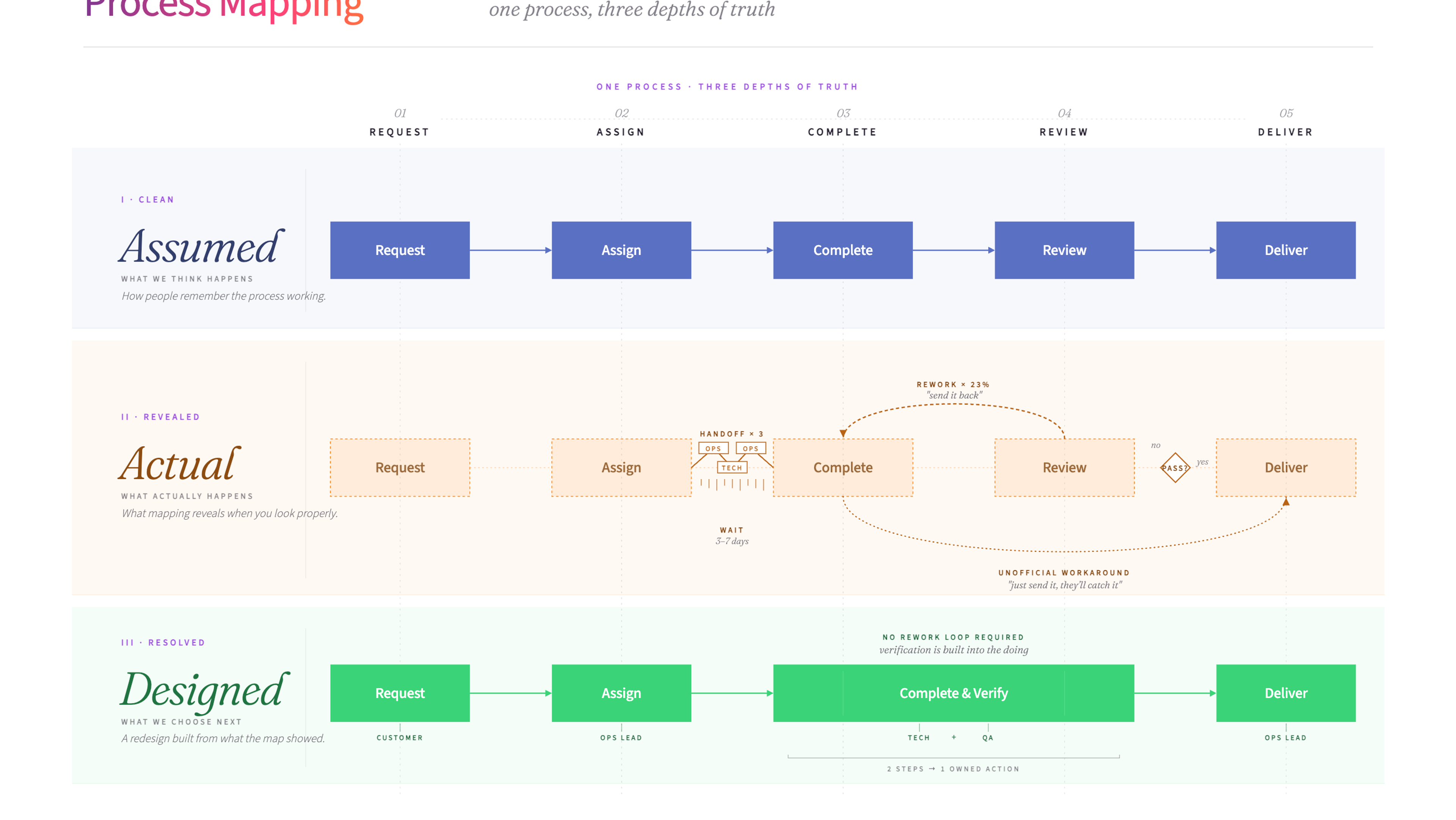
Process mapping is a visual method for documenting how a process works from start to finish. It helps teams see the full picture - every step, decision point, and handoff - so they can spot problems and design improvements.
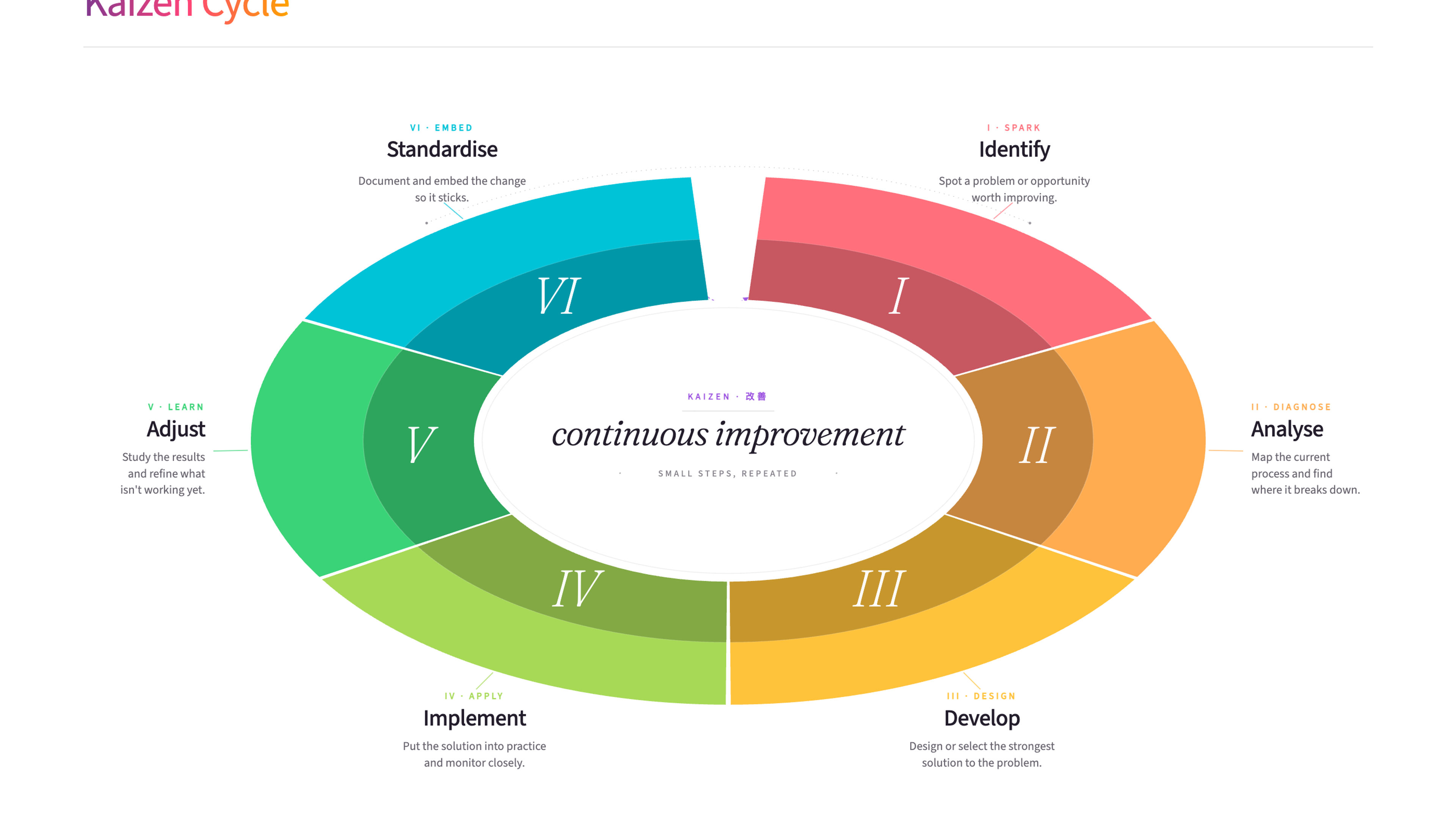
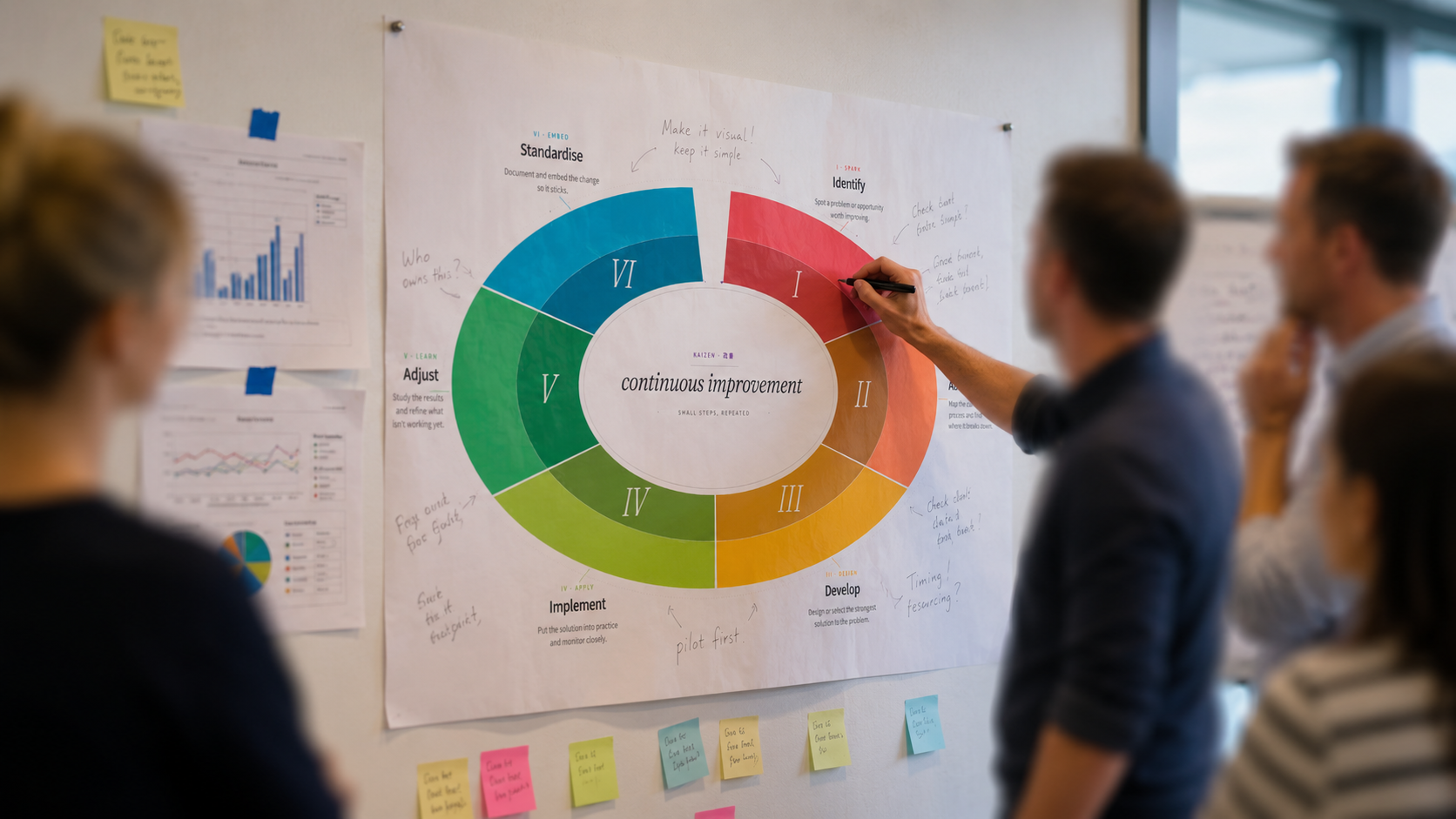
Kaizen is a Japanese continuous improvement philosophy built on the idea that small, ongoing changes add up to significant results over time. The Kaizen Cycle gives teams a structured way to identify improvements, test them, and build them into everyday work.
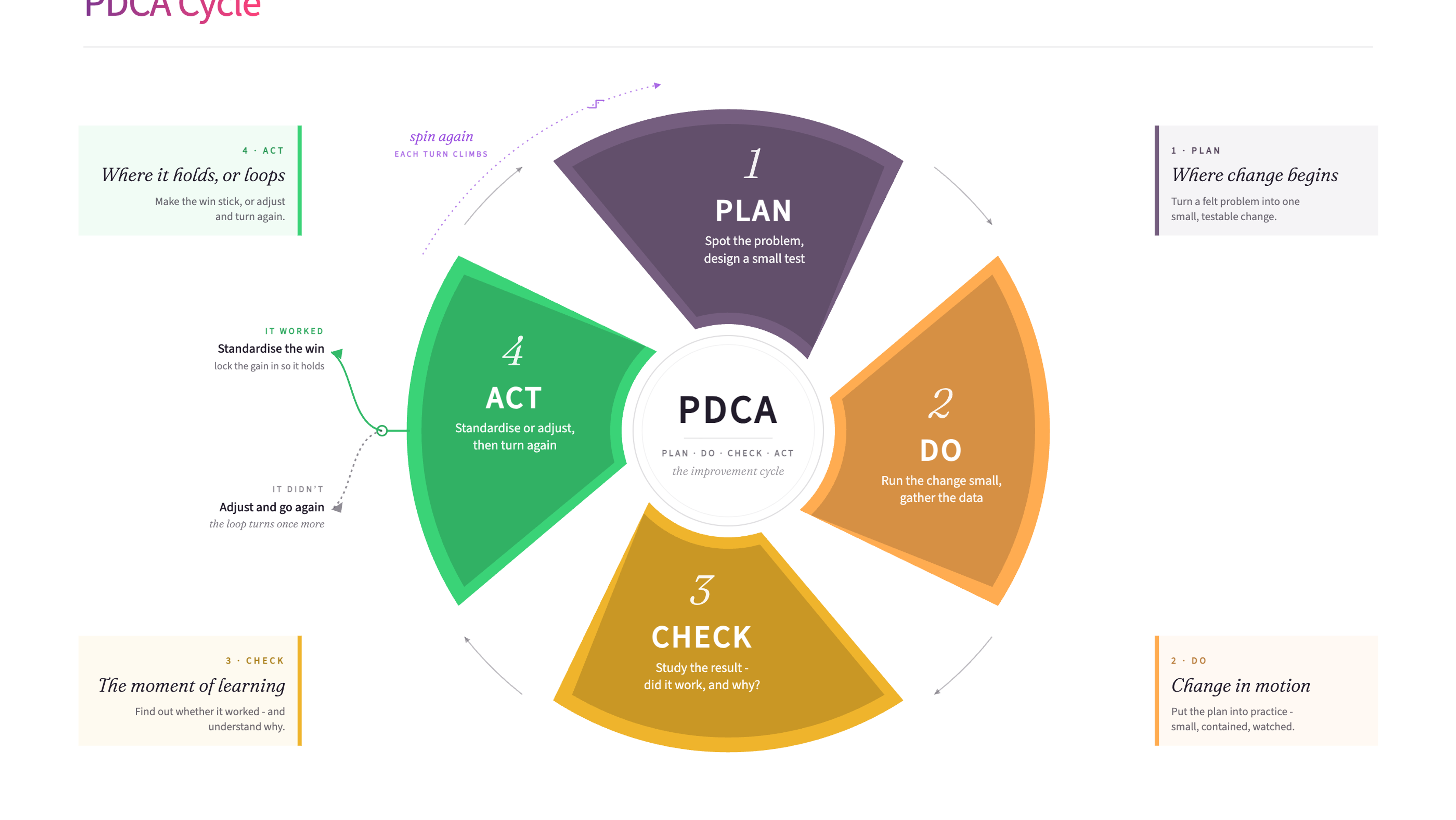
The PDCA Cycle (Plan, Do, Check, Act) is a continuous improvement framework for testing and refining processes. It creates a repeating loop of planning a change, trying it, checking whether it worked, and adjusting before the next round.
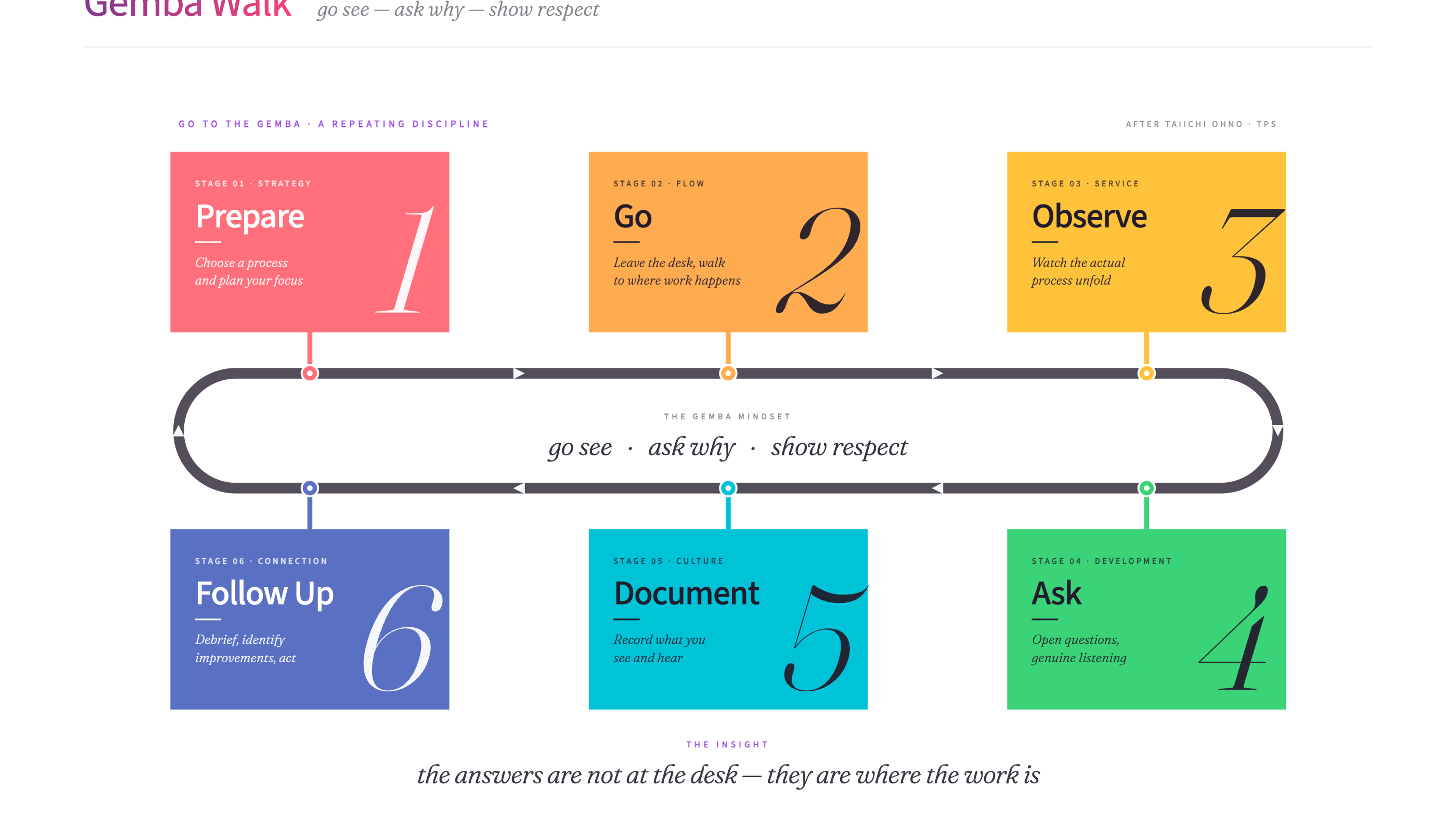
A Gemba Walk is a Lean practice where leaders go to the place where work actually happens to observe, listen, and understand. It bridges the gap between how leaders think work gets done and how it really gets done.
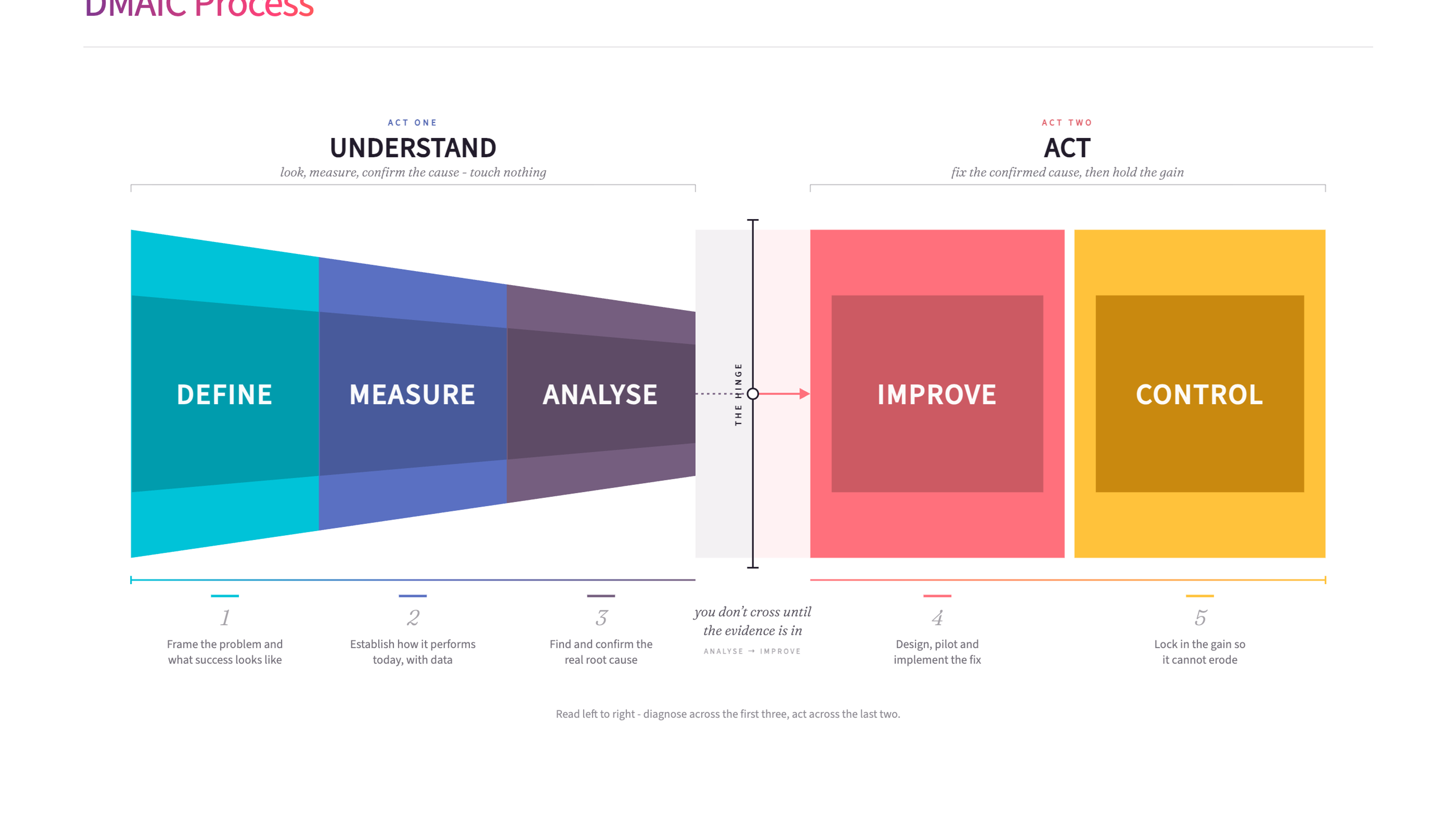
DMAIC (Define, Measure, Analyse, Improve, Control) is a structured problem-solving method from the Six Sigma toolkit. It gives teams a clear five-step process for improving existing processes using data and evidence.
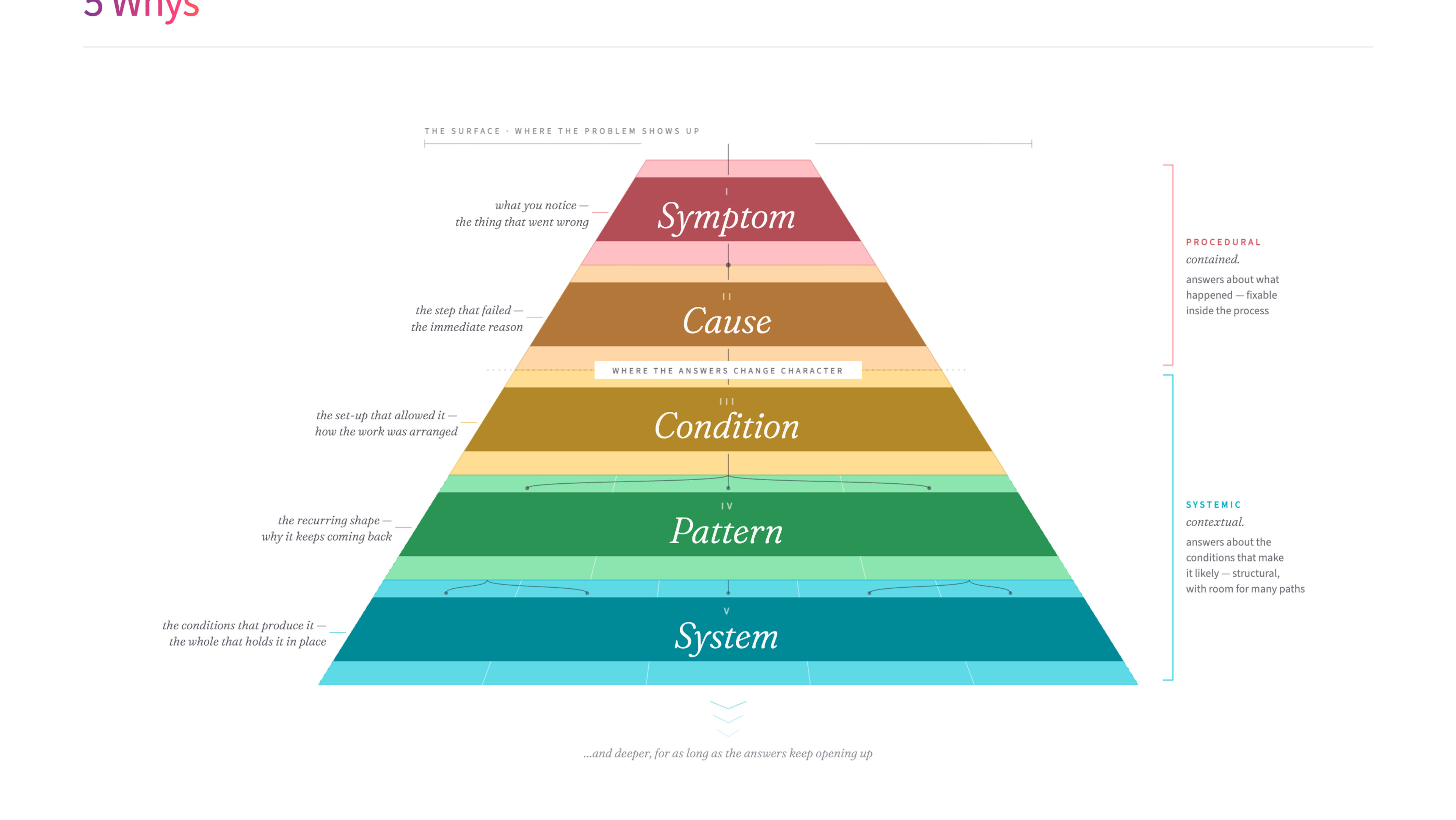
The 5 Whys is a simple root-cause analysis technique that drills into problems by asking "why?" repeatedly. It helps teams get past surface-level symptoms to find the real cause of an issue.

Every organisation has friction - the unnecessary effort, the needless complexity, the things that make simple work harder than it should be. This article explores how to find it, understand where it comes from, and reduce it without creating new problems in the process.

Every growing organisation needs better processes, structures, and governance. But the operational foundations only work if the conditions underneath them - how decisions travel, how information flows, how culture holds together at scale - evolve at the same pace. Here's what's worth understanding before the scaling work begins.
Continuous Improvement Training
Spotting waste is where a lot of improvement starts, and the Eight Wastes are one of several lenses in our Continuous Improvement training.
James Freeman-Gray is the founder of Mutomorro. He's an organisational development practitioner who has spent over twenty years working with leaders across public, private and nonprofit sectors - helping organisations pull together around a common purpose, joined up in how they work. More about who we are and what it's like to work with us.
The 8 Wastes framework is one of the more practical tools I use with operational teams. Walking through a process and naming the waste together - the waiting, the handoffs, the rework - creates energy for change because people can suddenly see things they'd stopped noticing. The waste was always there; they just needed a language for it.
Last reviewed: June 2026
Ready to use 8 Wastes of Lean?
Download the free template - includes practical guidance for workshops and team sessions.
Get the free template
Want to put these ideas into practice?
Whether you're navigating a merger, rethinking how you're structured, or trying to shift a culture that isn't working - underneath, it's the same job: getting the whole organisation pulling in the same direction. Start with a conversation.